
第三方系统检测人查询接口
本文档定义第三方系统向平台提供检测人数据查询能力的统一接口规范。
第三方只需按照本规范实现接口,云诊平台侧即可通过配置参数完成数据接入。
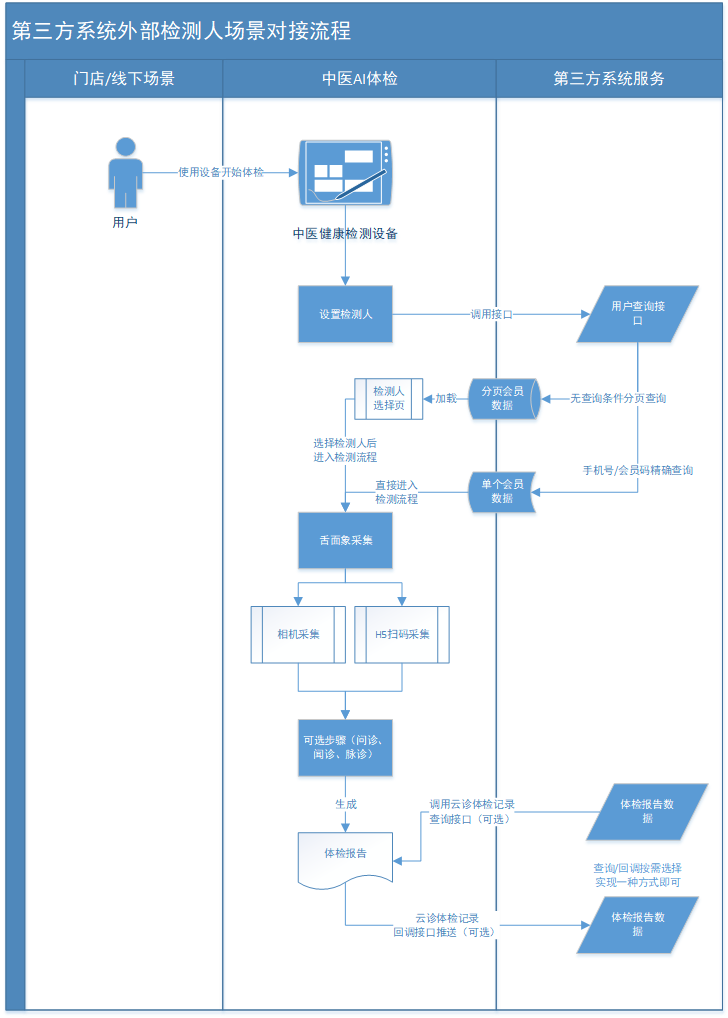
1. 接口开通及业务流程说明
第三方系统检测人查询接口需要与商务员联系申请开通。
开通接口前需要先提供客户侧查询接口(依据本文档描述实现)地址。
开通成功后,云诊技术对接负责人会提供接口相应秘钥。
2. 设计目标
- 标准第三方检测人数据查询接口
- 云诊平台侧仅通过配置(URL / AppKey / Secret)完成对接
- 支持鉴权、防篡改、防重放
- 支持条件查询与分页
- 支持稳定扩展与版本演进
3. 接口基本信息
| 项目 | 说明 |
|---|---|
| 协议 | HTTP / HTTPS(强烈建议 HTTPS) |
| 编码 | UTF-8 |
| 数据格式 | JSON |
| 传参方式 | 使用body传参 |
4. 接口描述
请求方法
POST
平台侧请求接口预设最大超时时间5秒,超时后设备显示超时提醒。
请求地址(建议使用)
POST /yzapi/checkperson/query
5. 鉴权机制
5.1 请求头定义
| Header 名称 | 是否必填 | 说明 |
|---|---|---|
| Content-Type | 是 | application/json |
| YZ-Timestamp | 是 | 当前时间戳(毫秒) |
| YZ-Nonce | 是 | 随机字符串(防重放) |
| YZ-Signature | 是 | 请求签名 |
5.2 签名算法
查询条件(queryContent)标准原文Canonical String拼接规则
| 原始值类型 | Canonical 中的值 |
|---|---|
null | 空字符串 "" |
"" | 空字符串 "" |
| 数值类型 | String.valueOf(value) |
说明:
null与""在 Canonical 中等价- 不进行
trim - 不进行
URL Encode - 使用
UTF-8编码,不包含BOM
pageNumber=1&pageSize=20&userNo=U10001&mobile=188000000000&name=张三
存在null或者 ""时:
pageNumber=1&pageSize=20&userNo=&mobile=&name=张三
签名字符串拼接规则
签名字符串拼接时,各参数前后不要拼接空格/连接符等特殊符号。
appKey + timestamp + nonce + queryContent
标准查询条件原文构造 示例
    /**
     * 构造标准签名原文
     * 形如:
     * <pre>pageNumber=1&pageSize=20&userNo=U10001&mobile=1880000000000&name=张三</pre>
     *
     * @return 签名原文
     */
    public static String getSignCanonicalString(UserQueryRequest request) {

        if (request == null) {
            return "";
        }

        // 固定顺序(TreeMap 按 key 排序)
        Map<String, String> sortedParams = new TreeMap<>();

        // 注意:null → ""
        sortedParams.put("pageNumber", valueOf(request.getPageNumber()));
        sortedParams.put("pageSize", valueOf(request.getPageSize()));
        sortedParams.put("userNo", valueOf(request.getUserNo()));
        sortedParams.put("mobile", valueOf(request.getMobile()));
        sortedParams.put("name", valueOf(request.getName()));

        StringBuilder canonical = new StringBuilder();
        for (Map.Entry<String, String> entry : sortedParams.entrySet()) {
            canonical.append(entry.getKey())
                    .append("=")
                    .append(entry.getValue())
                    .append("&");
        }

        // 去掉最后一个 &
        canonical.deleteCharAt(canonical.length() - 1);

        return canonical.toString();
    }

    private static String valueOf(Object value) {
        return value == null ? "" : String.valueOf(value);
    }
签名Java 示例
    /**
     * 签名
     *
     * @param appKey    key(开通接口后平台侧提供)
     * @param appSecret 秘钥(开通接口后平台侧提供)
     * @param timestamp 时间戳
     * @param nonce     随机数
     * @param body      查询参数
     * @return 签名
     */
    public static String sign(String appKey,
                              String appSecret,
                              String timestamp,
                              String nonce,
                              String body) {

        String content = appKey + timestamp + nonce + body;
        return new HmacUtils(HmacAlgorithms.HMAC_SHA_256, appSecret)
                .hmacHex(content);
    }
6. 请求参数定义
6.1 请求体结构
{
    "pageNumber": 1,
    "pageSize": 20,
    "userNo": "123456",
    "mobile": "13800000000",
    "name": "张三"
}
6.2 分页参数说明
| 字段 | 类型 | 必填 | 说明 |
|---|---|---|---|
| pageNumber | int | 是 | 页码,从 1 开始 |
| pageSize | int | 是 | 每页条数(默认传递20) |
6.3 查询条件说明
第三方可按自身能力支持其中部分字段。
未识别字段应忽略,不得报错。
| 字段 | 类型 | 说明 |
|---|---|---|
| userNo | String | 用户编号(唯一标识) |
| mobile | String | 手机号 |
| name | String | 用户姓名 |
7. 返回结果定义
7.1 成功返回示例
{
  "code": 200,
  "message": "success",
  "success": true,
  "timestamp": 1768794238380,
  "result": {
    "current": 1,
    "size": 20,
    "total": 105,
    "records": [
      {
        "userNo": "123456",
        "name": "张三",
        "mobile": "13800000000",
        "gender": "M",
        "birthday": "1995-01-01",
        "address": "",
        "allergyMedication": "",
        "medicalHistory": "",
        "idNumber": "342423199510014996",
        "height": "180.00",
        "weight": "80.00"
      }
    ]
  }
}
7.2 返回字段说明
顶层字段
| 字段 | 类型 | 说明 |
|---|---|---|
| code | Integer | 状态码,200 表示成功,其他为失败 |
| message | String | 状态描述 |
| success | bool | 接口调用成功标志:true/false |
| timestamp | Long | 时间戳 |
| result | Object | 分页数据 |
result 对象
| 字段 | 类型 | 说明 |
|---|---|---|
| current | int | 当前页码 |
| size | int | 每页大小 |
| total | long | 总记录数 |
| records | array | 用户数据列表 |
8. 检测人数据字段规范
| 字段 | 类型 | 是否必填 | 说明 |
|---|---|---|---|
| userNo | String | 否 | 用户唯一标识 |
| name | String | 是 | 姓名 |
| mobile | String | 否 | 手机号 |
| gender | String | 是 | M-男性 / F-女性 |
| birthday | String | 是 | yyyy-MM-dd |
| allergyMedication | String | 否 | 过敏药物 |
| medicalHistory | String | 否 | 现病史 |
| height | String | 否 | 身高(cm) |
| weight | String | 否 | 体重(kg) |
| idNumber | String | 否 | 身份证号 |
| address | String | 否 | 住址 |
9. 错误码规范
9.1 错误返回示例
{
  "code": "40101",
  "message": "签名错误",
  "success": false,
  "timestamp": 1768802522287,
  "result": null
}
9.2 错误码定义
| code | 含义 |
|---|---|
| 200 | 成功 |
| 40001 | 参数错误 |
| 40101 | 签名错误 |
| 40102 | 时间戳过期 |
| 40103 | 重复请求 |
| 40104 | 其他错误描述 |
10. 第三方服务端示例(Java)
/**
 * 第三方系统检测人查询接口  demo
 *
 * @author yzkj
 * @date 2026/1/19 14:42
 */
@RestController
@AllArgsConstructor
@RequestMapping("/yzapi")
public class demo {

    /**
     * 宽容时间
     */
    private static final long ALLOWED_TIME_WINDOW = 5 * 60 * 1000L;


    private static final String YZ_APP_KEY = "appKey";
    private static final String YZ_APP_SECRET = "appSecret";

    /**
     * 生产建议使用redis
     * 添加 TTL
     */
    private final Set<String> nonceKeyCache = ConcurrentHashMap.newKeySet();


    @PostMapping(value = "/checkperson/query")
    public ResultObj query(@RequestHeader("YZ-Timestamp") String timestamp,
                               @RequestHeader("YZ-Nonce") String nonce,
                               @RequestHeader("YZ-Signature") String signature,
                               @RequestBody UserQueryRequest requestRawBody) {

        // 1~4 步:统一鉴权
        // 1. 校验 timestamp
        long requestTime = Long.parseLong(timestamp);
        long now = System.currentTimeMillis();
        if (Math.abs(now - requestTime) > ALLOWED_TIME_WINDOW) {
            return ResultObj.error(40102, "时间戳过期");
        }

        // 2. 校验 nonce
        String nonceKey = YZ_APP_KEY + ":" + nonce;
        if (nonceKeyCache.contains(nonceKey)) {
            return ResultObj.error(40103, "重复请求");
        }
        // 生产系统建议添加 TTL 避免缓存过多随机码
        nonceKeyCache.add(nonceKey);

        // 3. 重新计算签名
        // 3.1 构造标准签名原文 Canonical String
        String signCanonicalString = getSignCanonicalString(requestRawBody);
        String expectedSignature = sign(YZ_APP_KEY, YZ_APP_SECRET, timestamp, nonce, signCanonicalString);

        // 4. 对比签名
        if (!expectedSignature.equals(signature)) {
            return ResultObj.error(40101, "签名错误");
        }

        // 5. 执行条件查询,返回分页数据
        // 自行处理业务数据查询
        List<ThirdPartyUserDTO> list = new ArrayList<>();
        // 模拟数据查询结果
        ThirdPartyUserDTO u1 = new ThirdPartyUserDTO("U10001", "张三", "13800000001", "M", "1990-01-15");
        ThirdPartyUserDTO u2 = new ThirdPartyUserDTO("U10002", "张四", "13800000002", "F", "1990-01-15");
        ThirdPartyUserDTO u3 = new ThirdPartyUserDTO("U10003", "王五", "13800000003", "M", "1990-01-15");

        list.add(u1);
        list.add(u2);
        list.add(u3);

        RecordResult recordResult = new RecordResult(1, 3, 3L, list);


        return ResultObj.data(recordResult);
    }

    /**
     * 构造查询条件标准签名原文
     * 形如:
     * <pre>pageNumber=1&pageSize=20&userNo=U10001&mobile=1880000000000&name=张三</pre>
     *
     * @return 签名原文
     */
    public static String getSignCanonicalString(UserQueryRequest request) {

        if (request == null) {
            return "";
        }

        // 固定顺序(TreeMap 按 key 排序)
        Map<String, String> sortedParams = new TreeMap<>();

        // 注意:null → ""
        sortedParams.put("pageNumber", valueOf(request.getPageNumber()));
        sortedParams.put("pageSize", valueOf(request.getPageSize()));
        sortedParams.put("userNo", valueOf(request.getUserNo()));
        sortedParams.put("mobile", valueOf(request.getMobile()));
        sortedParams.put("name", valueOf(request.getName()));

        StringBuilder canonical = new StringBuilder();
        for (Map.Entry<String, String> entry : sortedParams.entrySet()) {
            canonical.append(entry.getKey())
                    .append("=")
                    .append(entry.getValue())
                    .append("&");
        }

        // 去掉最后一个 &
        canonical.deleteCharAt(canonical.length() - 1);

        return canonical.toString();
    }

    private static String valueOf(Object value) {
        return value == null ? "" : String.valueOf(value);
    }

    /**
     * 签名
     *
     * @param appKey    key(开通接口后平台侧提供)
     * @param appSecret 秘钥(开通接口后平台侧提供)
     * @param timestamp 时间戳
     * @param nonce     随机数
     * @param body      查询参数
     * @return 签名
     */
    public static String sign(String appKey,
                              String appSecret,
                              String timestamp,
                              String nonce,
                              String body) {

        String content = appKey + timestamp + nonce + body;
        return new HmacUtils(HmacAlgorithms.HMAC_SHA_256, appSecret).hmacHex(content);
    }


    /**
     * 查询参数
     */
    @Data
    public static class UserQueryRequest {
        /**
         * 当前页码,从 1 开始
         */
        private Integer pageNumber;
        /**
         * 每页条数(默认传递20)
         */
        private Integer pageSize;
        /**
         * 用户编号(唯一标识)
         */
        private String userNo;
        /**
         * 手机号
         */
        private String mobile;
        /**
         * 用户姓名
         */
        private String name;

    }

    /**
     * 检测人对象
     */
    @Data
    @AllArgsConstructor
    public static class ThirdPartyUserDTO implements Serializable {

        /**
         * 用户唯一标识
         */
        private String userNo;

        /**
         * 姓名
         */
        private String name;

        /**
         * 手机号
         */
        private String mobile;

        /**
         * 性别:M-男性 / F-女性
         */
        private String gender;

        /**
         * 生日,格式 yyyy-MM-dd
         */
        private String birthday;

        /**
         * 过敏药物
         */
        private String allergyMedication;

        /**
         * 现病史
         */
        private String medicalHistory;

        /**
         * 身高(cm)
         */
        private BigDecimal height;

        /**
         * 体重(kg)
         */
        private BigDecimal weight;

        /**
         * 身份证号
         */
        private String idNumber;

        /**
         * 住址
         */
        private String address;


        public ThirdPartyUserDTO(String userNo, String name, String mobile, String gender, String birthday) {
            this.userNo = userNo;
            this.name = name;
            this.mobile = mobile;
            this.gender = gender;
            this.birthday = birthday;
        }


    }


    /**
     * 分页查询返回
     */
    @Data
    @AllArgsConstructor
    public static class RecordResult implements Serializable {

        /**
         * 当前页码
         */
        private Integer current;

        /**
         * 每页大小
         */
        private Integer size;

        /**
         * 总记录数
         */
        private Long total;

        /**
         * 用户数据列表
         */
        private List<ThirdPartyUserDTO> records;

    }


    @Data
    public static class ResultObj implements Serializable {

        private static final long serialVersionUID = 1L;

        /**
         * 成功标志
         */
        private boolean success;

        /**
         * 消息
         */
        private String message;

        /**
         * 返回代码
         */
        private Integer code;

        /**
         * 时间戳
         */
        private long timestamp = System.currentTimeMillis();

        /**
         * 结果对象
         */
        private RecordResult result;


        /**
         * 返回失败
         *
         * @param code 状态码
         * @param msg  返回消息
         * @return 消息
         */
        public static ResultObj error(Integer code, String msg) {
            ResultObj resultObj = new ResultObj();
            resultObj.setSuccess(false);
            resultObj.setMessage(msg);
            resultObj.setCode(code);
            resultObj.setResult(null);

            return resultObj;
        }

        /**
         * 返回成功
         *
         * @return 消息
         */
        public static ResultObj data(RecordResult result) {
            ResultObj resultObj = new ResultObj();
            resultObj.setSuccess(true);
            resultObj.setMessage("");
            resultObj.setCode(200);
            resultObj.setResult(result);

            return resultObj;
        }


    }

}
11. 接口变更说明
2026.1.20
第三方系统检测人查询接口API上线。